---
title: Crown & Bridge Workflow Masterclass - Dr. Shea Tolbert
description: Learn the workflow to 3D print custom, strong crowns that cost just $2 each with SprintRay.
image: https://info.sprintray.com/hubfs/Dr.%20Shea%20Tolbert0.jpg
---
[](https://sprintray.com/)
- [Digital Dentistry](https://sprintray.com/digital-dentistry/)
- [Overview](https://sprintray.com/digital-dentistry/)
- [Accuracy and Consistency](https://sprintray.com/digital-dentistry/sprintray-3d-printer-accuracy/)
- [Surgical Guides](https://sprintray.com/digital-dentistry/surgical-guides/)
- [Dental Models](https://sprintray.com/digital-dentistry/dental-models/)
- [Digital Dentures](https://sprintray.com/digital-dentistry/dentures/)
- [Clear Aligners](https://sprintray.com/digital-dentistry/clear-aligners/)
- [Provisionals and Wax-Ups](https://sprintray.com/digital-dentistry/3d-print-provisionals-and-wax-ups/)
- [Indirect Bonding Trays](https://sprintray.com/digital-dentistry/3d-print-provisionals-and-wax-ups/)
- [Crowns and Bridges](https://sprintray.com/digital-dentistry/crowns-and-bridges/)
- [Occlusal Guards and Splints](https://sprintray.com/digital-dentistry/occlusal-guards-and-splints/)
- [Products](https://sprintray.com/dental-3d-printers/)
- [Dental 3D Printers](https://sprintray.com/dental-3d-printers/)
- [Pro Desktop 3D Printer](https://sprintray.com/pro-desktop-3dprinter/)
- [MoonRay 3D Printer](https://sprintray.com/moonray-desktop-3d-printer/)
- [Pro Wash/Dry](https://sprintray.com/pro-wash-dry-dental-models/)
- [Pro Cure Post-Processing](https://sprintray.com/pro-cure-automated-uv-post-curing/)
- [3D Printing Materials](https://sprintray.com/dental-3d-printing-materials/)
- [SprintRay Materials](https://sprintray.com/dental-3d-printing-materials/)
- [Open Certified Materials](https://sprintray.com/sprintray-open-certified-resin-system/)
- [RayWare Software](https://sprintray.com/software/)
- [Dashboard and Design](https://sprintray.com/dental-appliance-design-service/)
- [Support](http://support.sprintray.com/)
- [Help Center](http://support.sprintray.com/)
- [Free Training](https://sprintray.com/training/)
- [Warranty Registration](https://sprintray.com/register-warranty-service-plan/)
- [Request Assistance](https://sprintray.com/customer-service-concierge/)
- [Safety Data Sheet](https://sprintray.com/sds/)
- [Company](https://sprintray.com/company/)
- [About SprintRay](https://sprintray.com/company/)
- [Live Webinars](https://sprintray.com/webinar/)
- [Events Calendar](https://sprintray.com/events-calendar/)
- [Partners and Distributors](https://sprintray.com/company/partners/)
- [Careers](https://sprintray.com/company/careers/)
- [Blog](https://sprintray.com/blog/)
- [Contact Us](https://sprintray.com/company/contact-us/)
- [Consulting](https://sprintray.com/consult-digital-dentistry/)
- [Store](https://store.sprintray.com/)
# Dr. Shea Tolbert
Cosmetic Dentist & Founder of Launch Digital Dentistry
Start Masterclass

#### Learn From the Best
Fill out the form to access all SprintRay Masterclass content for free.
- [Scan](https://info.sprintray.eu/../../../com/sprintray/info/index.html?hsLang=de-de)
- [Plan](https://info.sprintray.eu/../../../com/sprintray/info/index.html?hsLang=de-de)
- [Print](https://info.sprintray.eu/../../../com/sprintray/info/index.html?hsLang=de-de)
- [Process](https://info.sprintray.eu/../../../com/sprintray/info/index.html?hsLang=de-de)
- [Deliver](https://info.sprintray.eu/../../../com/sprintray/info/index.html?hsLang=de-de)

Scan
## Capture Data
Scan
## Capture Data
Every restorative procedure starts with high quality data. Capture upper and lower arch scans along with optional CBCT scan for a complete anatomical picture.
**Compatible Scanners**
- 3Shape
- Medit
- Carestream
- CEREC
- ETC


Plan
## Treatment Plan
Plan
## Treatment Plan
Design custom restoration using 3D CAD software. Check fit and occlusion digitally, then send to your SprintRay 3D printer.
**Total Treatment Control**
- Custom design
- Full workflow control
- Rapid turnaround

## Schedule a Demo
Learn how 3D printing can revolutionize your workflow.
[](https://cta-service-cms2.hubspot.com/web-interactives/public/v1/track/redirect?encryptedPayload=AVxigLIMKfoxsxziMK4kxgXoQDyHBRQ0%2FiGZBfmq0WVs7Wmk5GVjqzSPvGiiPtARBBcvz1kfhLD2xmgAVONidTZKBhMNGqSxsexXIyigsZCJ%2F4ZTCbP4XadZCMcbw47DFAGRvndh1sBcNJNtzE1ZfRmTxQ%2FmjzBY%2BV5UV6imiDubg9D7ru338XRLPVxd0K3A2Lk%3D&webInteractiveContentId=178272651961&portalId=20417134)

Print
## Print and Process
Print
## Print and Process
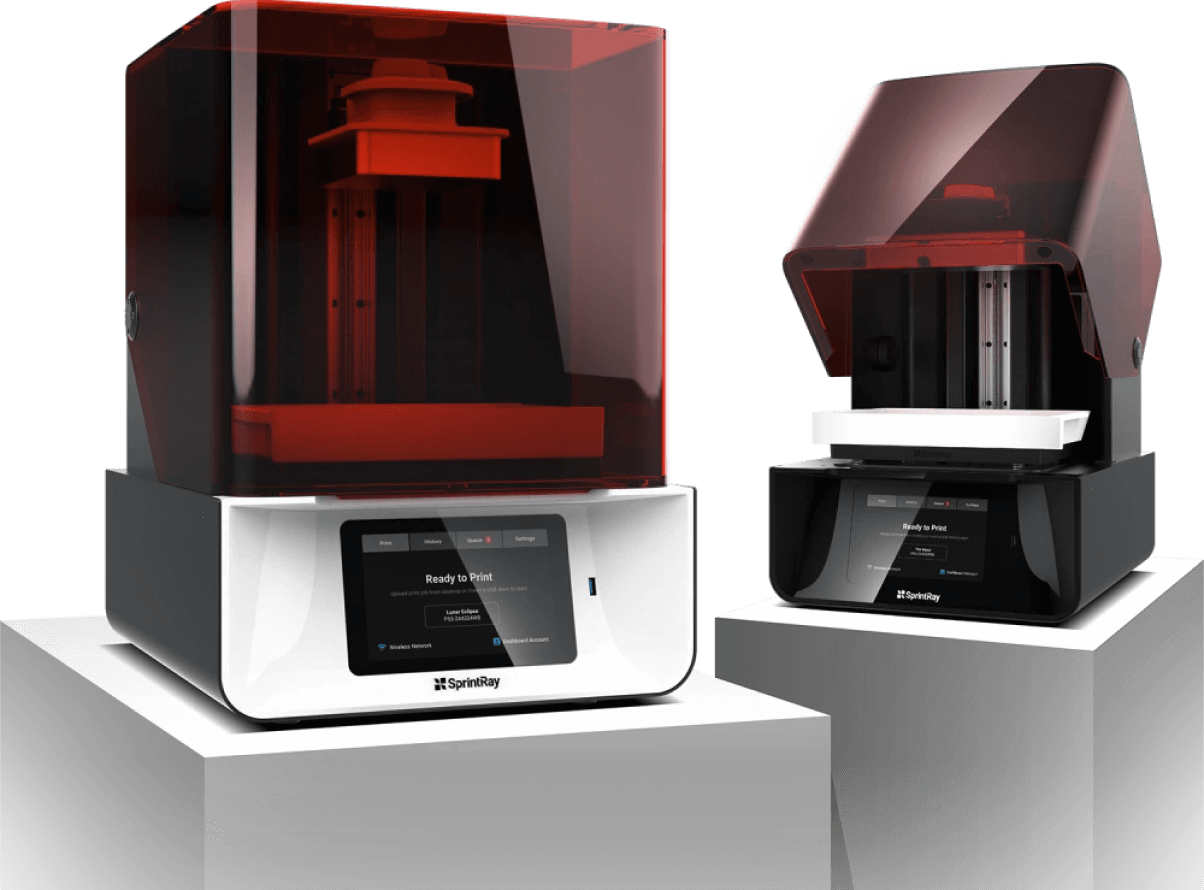
Once you’ve approved your design, send it to your Sprintray Pro, where it will print in around 45 minutes. Wash and post-cure your guide for FDA compatibility and optimal mechanical performance.
**Frictionless Printing Workflow**
- Rapid prints with SprintRay Pro
- One-touch wash with Pro Wash
- FDA-compliant outputs with Pro Cure

## Fabrication, Simplified
From design to print to patient delivery, SprintRay delivers the promise of digital dentistry by offering a fully-integrated 3D printing solution. Cut long lead times, learning curves, and costs associated with traditional lab and CAD/CAM production by introducing the Frictionless Workflow into your practice with the SprintRay ecosystem.

Process for Delivery
## Clinical Preparation
Process for Delivery
## Clinical Preparation
Remove supports and polish restoration. Characterize and stain to achieve a high-quality finish.
**Preparation Tips**
- Remove supports after washing and curing
- Use lab handpiece to create a smooth finish
- Characterize to bring restoration to life


Deliver
## Placement
Deliver
## Placement
Use standard cement to place the restoration. 3D printed crowns fit great and save chairside time, requiring minimal adjustments.
**Benefits of 3D Printed Restorations**
- Rapid, custom provisionalization
- Accurate, repeatable placement
- Improved patient experience

## Schedule a Demo
Learn how 3D printing can revolutionize your workflow.
[](https://cta-service-cms2.hubspot.com/web-interactives/public/v1/track/redirect?encryptedPayload=AVxigLIMKfoxsxziMK4kxgXoQDyHBRQ0%2FiGZBfmq0WVs7Wmk5GVjqzSPvGiiPtARBBcvz1kfhLD2xmgAVONidTZKBhMNGqSxsexXIyigsZCJ%2F4ZTCbP4XadZCMcbw47DFAGRvndh1sBcNJNtzE1ZfRmTxQ%2FmjzBY%2BV5UV6imiDubg9D7ru338XRLPVxd0K3A2Lk%3D&webInteractiveContentId=178272651961&portalId=20417134)
English
- [Deutsch](https://sprintray.com/de/)
- [Français](https://sprintray.com/fr/)
- [Español](https://sprintray.com/es/)

The Next 100 Years of Dentistry
## Digital Dentistry
- [Digital Dentistry Overview](https://sprintray.com/digital-dentistry/)
- [Surgical Guides](https://sprintray.com/digital-dentistry/surgical-guides/)
- [Removable Dies and Study Models](https://sprintray.com/digital-dentistry/dental-models/)
- [Digital Dentures and Try-ins](https://sprintray.com/digital-dentistry/dentures/)
- [Clear Aligners](https://sprintray.com/digital-dentistry/clear-aligners/)
- [Indirect Bonding Trays](https://sprintray.com/digital-dentistry/indirect-bonding-trays/)
- [Occlusal Guards and Splints](https://sprintray.com/digital-dentistry/occlusal-guards-and-splints/)
- [Crowns and Bridges](https://sprintray.com/digital-dentistry/crowns-and-bridges/)
## Products
- [SprintRay Pro Desktop 3D Printer](https://sprintray.com/pro-desktop-3dprinter/)
- [Pro Cure Post-processing System](https://sprintray.com/pro-cure-automated-uv-post-curing/)
- [3D Printing Materials](https://sprintray.com/dental-3d-printing-materials/)
- [RayWare Software](https://sprintray.com/software/)
- [SprintRay Dashboard](http://dashboard.sprintray.com/)
- [MoonRay Desktop 3D Printer](https://sprintray.com/moonray-desktop-3d-printer/)
## Support and Training
- [Help Center](http://support.sprintray.com/)
- [Request Assistance](https://sprintray.com/customer-service-concierge/)
- [Free Training](https://sprintray.com/training/)
- [Free Sales Consulting](https://sprintray.com/consult-digital-dentistry/)
- [Register Warranty](https://sprintray.com/register-warranty-service-plan/)
- [Safety Data Sheet](https://sprintray.com/sds/)
## Company
- [Store](http://store.sprintray.com/)
- [About SprintRay Inc.](https://sprintray.com/company/)
- [Events Calendar](https://sprintray.com/events-calendar/)
- [Partners and Resellers](https://sprintray.com/company/partners/)
- [Become a Partner](https://sprintray.com/company/become-partner-distributor/)
- [Careers](https://sprintray.com/company/careers/)
- [Contact Us](https://sprintray.com/company/contact-us/)
## Free Consultation
Set up a free consulting session with our sales team to see how 3D printing can dramatically enhance your dental practice and help improve patient care from day one.
[Schedule a Session](https://sprintray.com/consult-digital-dentistry/)
## Customer Support
Successful printing is crucial to your practice. If you’re experiencing issues, please get in touch. Our customer support team works Monday through Friday, 7AM - 5PM PST.
[Request Assistance](https://sprintray.com/customer-service-concierge/)
## Other Questions?
If you have general questions or business inquiries, we’re available Monday through Friday, 7AM - 5PM PST. We’d love to hear from you.
[Call us - (800) 914-8004](https://info.sprintray.eu/../../../com/sprintray/info/index.html?hsLang=de-de)
Copyright © 2022 SprintRay Inc. All rights reserved.
[Privacy Policy](https://sprintray.com/legal-privacy-policy) | [Terms of Service](https://sprintray.com/legal-website-terms-of-use)